 HOW DO I USE AUTOBUILD ?? return to AutoBuild main page The first step to placing an order is to select "I WANT TO COMPLETE AN ORDER" from the previous page. You will then see an actual CitysBest website on the following page in the right frame -- you may browse through it as you would any other website, visiting any individual pages you desire. At any point, use the pull-down windows on the left to change the appearance of the website -- simply select the style, icons, background, affiliation and/or logo and then click on the SHOW SITE button. Once you've found the design you want, click on the PERSONALIZE button near the bottom to provide information necessary to customize the site to your needs. You will enter a variety of information about yourself and the services you offer, and the website in the right frame will automatically be updated. Once you have found a design that you like, and have personalized the website, click on the ORDER button at the bottom to place an order. Once you have provided the necessary information on the order page, your request will automatically processed, and a representative from CitysBest will call or email within 72 hours to confirm the purchase. 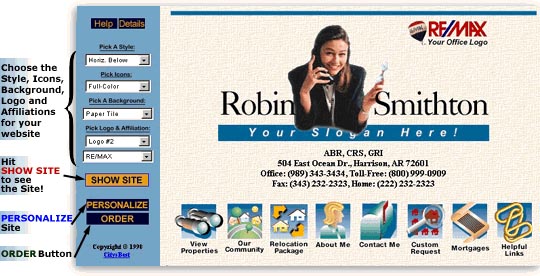
If you have any problems using our program, or require additional assistance, feel free to call (1-573-875-4001) or email (customerservice@superagentsites.com) anytime. Copyright © 2001 Super Agent Sites All Rights Reserved |